Pcf-Dependent-Libraries
Pcf-Dependent-Libraries is an code AI skill with a core value of Using dependent libraries in PCF components. It
helps developers solve real-world problems in the code domain, boosting
efficiency, automating repetitive tasks, and optimizing workflows.
Using dependent libraries in PCF components
Quick Facts
mkdir -p ./skills/pcf-dependent-libraries && curl -sfL https://raw.githubusercontent.com/github/awesome-copilot/main/skills/pcf-dependent-libraries/SKILL.md -o ./skills/pcf-dependent-libraries/SKILL.mdRun in terminal / PowerShell. Requires curl (Unix) or PowerShell 5+ (Windows).
Skill Content
# Dependent Libraries (Preview)
[This topic is pre-release documentation and is subject to change.]
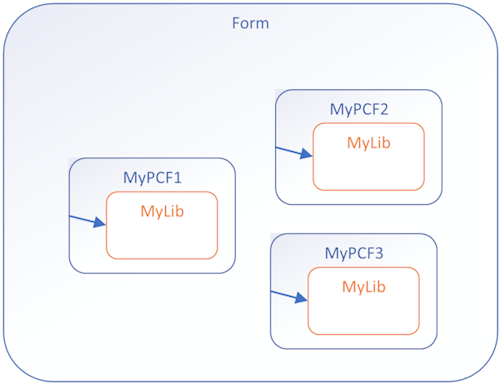
With model-driven apps, you can reuse a prebuilt library contained in another component that is loaded as a dependency to more than one component.
Having copies of a prebuilt library in multiple controls is undesirable. Reusing existing libraries improves performance, especially when the library is large, by reducing the load time for all components that use the library. Library reuse also helps reduce the maintenance overhead in build processes.
Before and After
**Before**: Custom library files contained in each PCF component
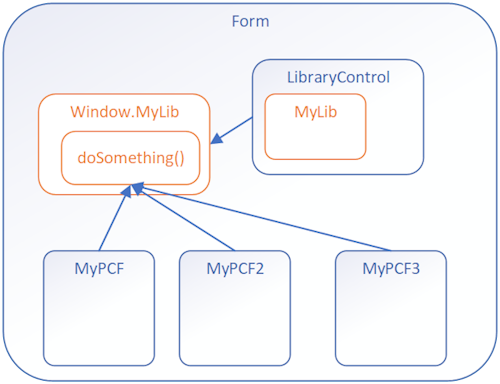
**After**: Components calling a shared function from a Library Control
Implementation Steps
To use dependent libraries, you need to:
1. Create a **Library component** that contains the library. This component can provide some functionality or only be a container for the library.
2. Configure another component to depend on the library loaded by the library component.
By default, the library loads when the dependent component loads, but you can configure it to load on demand.
This way you can independently maintain the library in the Library Control and the dependent controls don't need to have a copy of the library bundled with them.
How It Works
You need to add configuration data to your component project so that the build process deploys your libraries the way you want. Set this configuration data by adding or editing the following files:
- **featureconfig.json**
- **webpack.config.js**
- Edit the manifest schema to **Register dependencies**
featureconfig.json
Add this file to override the default feature flags for a component without modifying the files generated in the `node_modules` folder.
**Feature Flags:**
| Flag | Description |
|------|-------------|
| `pcfResourceDependency` | Enables the component to use a library resource. |
| `pcfAllowCustomWebpack` | Enables the component to use a custom web pack. This feature must be enabled for components that define a library resource. |
By default, these values are `off`. Set them to `on` to override the default.
**Example 1:**
{
  "pcfAllowCustomWebpack": "on"
}
**Example 2:**
{
   "pcfResourceDependency": "on",
   "pcfAllowCustomWebpack": "off"
}
webpack.config.js
The build process for components uses [Webpack](https://webpack.js.org/) to bundle the code and dependencies into a deployable asset. To exclude your libraries from this bundling, add a `webpack.config.js` file to the project root folder that specifies the alias of the library as `externals`. [Learn more about the Webpack externals configuration option](https://webpack.js.org/configuration/externals/)
This file might look like the following when the library alias is `myLib`:
/* eslint-disable */
"use strict";

module.exports = {
  externals: {
    "myLib": "myLib"
  },
}
Register Dependencies
Use the [dependency element](https://learn.microsoft.com/en-us/power-apps/developer/component-framework/manifest-schema-reference/dependency) within [resources](https://learn.microsoft.com/en-us/power-apps/developer/component-framework/manifest-schema-reference/resources) of the manifest schema.
<resources>
  <dependency
    type="control"
    name="samples_SampleNS.SampleStubLibraryPCF"
    order="1"
  />
  <code path="index.ts" order="2" />
</resources>
Dependency as On-Demand Load of a Component
Rather than loading the dependent library when a component loads, you can load the dependent library on deman
🎯 Best For
- Claude users
- GitHub Copilot users
- Software engineers
- Development teams
- Tech leads
💡 Use Cases
- Code quality improvement
- Best practice enforcement
📖 How to Use This Skill
- 1
Install the Skill
Copy the install command from the Terminal tab and run it. The SKILL.md file downloads to your local skills directory.
- 2
Load into Your AI Assistant
Open Claude or GitHub Copilot and reference the skill. Paste the SKILL.md content or use the system prompt tab.
- 3
Apply Pcf-Dependent-Libraries to Your Work
Open your project in the AI assistant and ask it to apply the skill. Start with a small module to verify the output quality.
- 4
Review and Refine
Review AI suggestions before committing. Run tests, check for regressions, and iterate on the skill output.
❓ Frequently Asked Questions
Is Pcf-Dependent-Libraries compatible with Cursor and VS Code?
Yes — this skill works with any AI coding assistant including Cursor, VS Code with Copilot, and JetBrains IDEs.
Do I need specific dependencies for Pcf-Dependent-Libraries?
Check the install command and Works With section. Most code skills only require the AI assistant and your codebase.
How do I install Pcf-Dependent-Libraries?
Copy the install command from the Terminal tab and run it. The skill downloads to ./skills/pcf-dependent-libraries/SKILL.md, ready to use.
Can I customize this skill for my team?
Absolutely. Edit the SKILL.md file to add team-specific instructions, examples, or workflows.
⚠️ Common Mistakes to Avoid
Skipping validation
Always test AI-generated code changes, even for simple refactors.
Missing dependency updates
Check if the skill requires updated dependencies or new packages.