Pcf-Events
Pcf-Events is an code AI skill with a core value of Define and handle custom events in PCF components. It
helps developers solve real-world problems in the code domain, boosting
efficiency, automating repetitive tasks, and optimizing workflows.
Define and handle custom events in PCF components
Quick Facts
mkdir -p ./skills/pcf-events && curl -sfL https://raw.githubusercontent.com/github/awesome-copilot/main/skills/pcf-events/SKILL.md -o ./skills/pcf-events/SKILL.mdRun in terminal / PowerShell. Requires curl (Unix) or PowerShell 5+ (Windows).
Skill Content
# Define Events (Preview)
[This topic is pre-release documentation and is subject to change.]
A common requirement when building custom components with the Power Apps Component Framework is the ability to react to events generated within the control. These events can be invoked either due to user interaction or programmatically via code. For example, an application can have a code component that lets a user build a product bundle. This component can also raise an event which could show product information in another area of the application.
Component Data Flow
The common data flow for a code component is data flowing from the hosting application into the control as inputs and updated data flowing out of the control to the hosting form or page. This diagram shows the standard pattern of data flow for a typical PCF component:
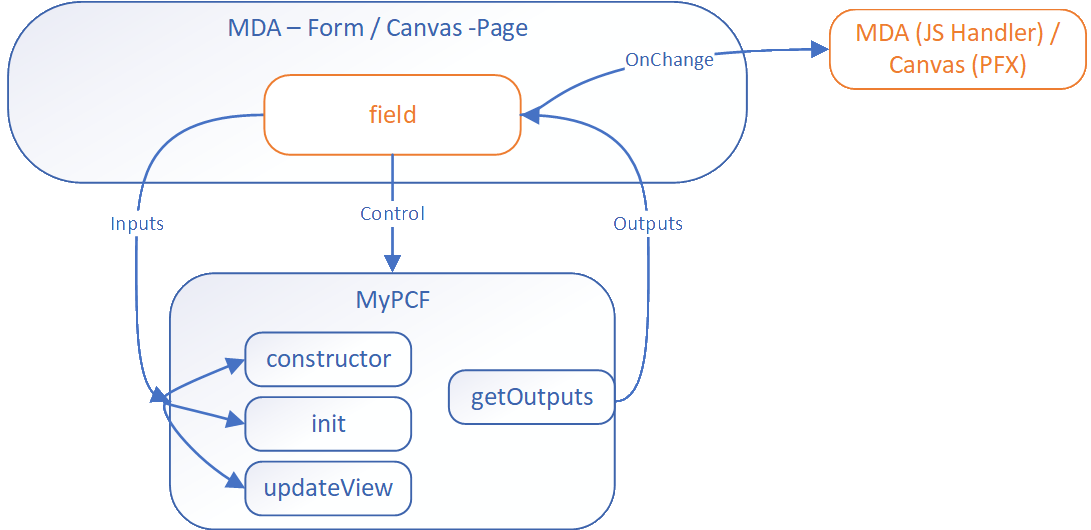
The data update from the code component to the bound field triggers the `OnChange` event. For most component scenarios, this is enough and makers just add a handler to trigger subsequent actions. However, a more complicated control might require events to be raised that aren't field updates. The event mechanism allows code components to define events that have separate event handlers.
Using Events
The event mechanism in PCF is based on the standard event model in JavaScript. The component can define events in the manifest file and raise these events in the code. The hosting application can listen to these events and react to them.
Define Events in Manifest
The component defines events using the [event element](https://learn.microsoft.com/en-us/power-apps/developer/component-framework/manifest-schema-reference/event) in the manifest file. This data allows the respective hosting application to react to events in different ways.
<property
  name="sampleProperty"
  display-name-key="Property_Display_Key"
  description-key="Property_Desc_Key"
  of-type="SingleLine.Text"
  usage="bound"
  required="true"
/>
<event
  name="customEvent1"
  display-name-key="customEvent1"
  description-key="customEvent1"
/>
<event
  name="customEvent2"
  display-name-key="customEvent2"
  description-key="customEvent2"
/>
Canvas Apps Event Handling
Canvas apps react to the event using Power Fx expressions:
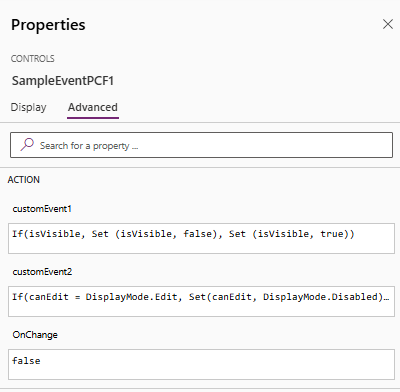
Model-Driven Apps Event Handling
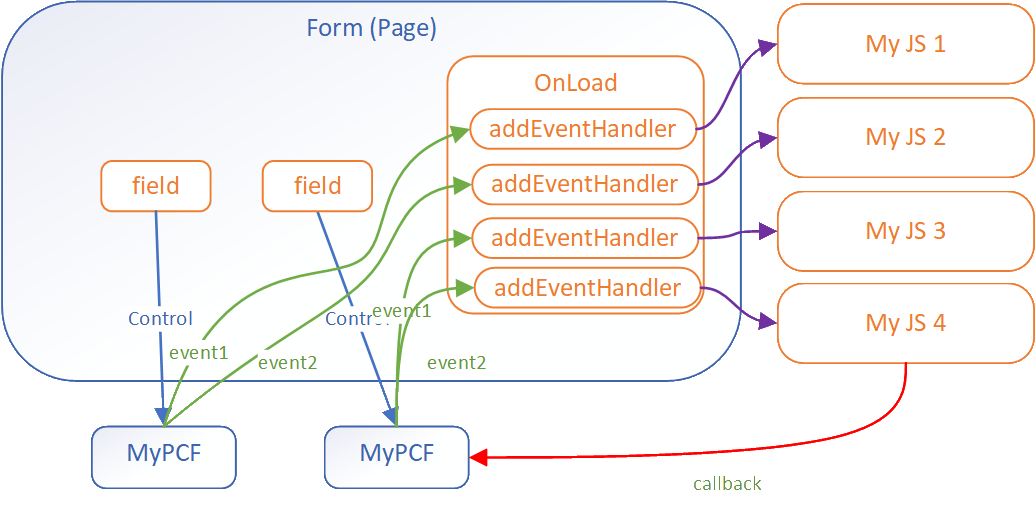
Model Driven Apps use the [addEventHandler method](https://learn.microsoft.com/en-us/power-apps/developer/model-driven-apps/clientapi/reference/controls/addeventhandler) to associate event handlers to custom events for a component.
const controlName1 = "cr116_personid";

this.onLoad = function (executionContext) {
  const formContext = executionContext.getFormContext();

  const sampleControl1 = formContext.getControl(controlName1);
  sampleControl1.addEventHandler("customEvent1", this.onSampleControl1CustomEvent1);
  sampleControl1.addEventHandler("customEvent2", this.onSampleControl1CustomEvent2);
}
> **Note**: These events occur separately for each instance of the code component in the app.
Defining an Event for Model-Driven Apps
For model-driven apps you can pass a payload with the event allowing for more complex scenarios. For example in the diagram below the component passes a callback function in the event allowing the script handling to call back to the component.
this.onSampleCont🎯 Best For
- Claude users
- GitHub Copilot users
- Software engineers
- Development teams
- Tech leads
💡 Use Cases
- Code quality improvement
- Best practice enforcement
📖 How to Use This Skill
- 1
Install the Skill
Copy the install command from the Terminal tab and run it. The SKILL.md file downloads to your local skills directory.
- 2
Load into Your AI Assistant
Open Claude or GitHub Copilot and reference the skill. Paste the SKILL.md content or use the system prompt tab.
- 3
Apply Pcf-Events to Your Work
Open your project in the AI assistant and ask it to apply the skill. Start with a small module to verify the output quality.
- 4
Review and Refine
Review AI suggestions before committing. Run tests, check for regressions, and iterate on the skill output.
❓ Frequently Asked Questions
Is Pcf-Events compatible with Cursor and VS Code?
Yes — this skill works with any AI coding assistant including Cursor, VS Code with Copilot, and JetBrains IDEs.
Do I need specific dependencies for Pcf-Events?
Check the install command and Works With section. Most code skills only require the AI assistant and your codebase.
How do I install Pcf-Events?
Copy the install command from the Terminal tab and run it. The skill downloads to ./skills/pcf-events/SKILL.md, ready to use.
Can I customize this skill for my team?
Absolutely. Edit the SKILL.md file to add team-specific instructions, examples, or workflows.
⚠️ Common Mistakes to Avoid
Skipping validation
Always test AI-generated code changes, even for simple refactors.
Missing dependency updates
Check if the skill requires updated dependencies or new packages.